
How
TurboTape Works
Harrie De Ceukelaire
With Ottls Cowper, Technical Editor, And Charles Brannon, Program Editor
Harrie De Ceukelaire
With Ottls Cowper, Technical Editor, And Charles Brannon, Program Editor
Last month COMPUTE! unveiled "TurboTape," a breakthrough program that makes Commodore 64 and VIC-20 tapes save and load as fast as disks. Although it's not necessary to know how TurboTape works in order to use it, this month's article explains the inner workings of the technique for programmers and technicians.
How can an ordinary cassette drive transfer data as fast as a 1541 disk drive? A few months ago, the answer would have been that it can't. But that was before "TurboTape." If you tried the TurboTape program published in last month's COMPUTE!, you know that something unusual is going on. VIC and 64 tapes really do load as fast as 1541 disks-sometimes even faster.
But how? TurboTape seems to violate a longstanding rule in personal computing. Tapes are always slower than disks, right?
To understand how TurboTape works, it helps to first understand how normal tape SAVEs and LOADs operate. Commodore's scheme for storing data on tape is quite complex-probably the most sophisticated used by any microcomputer manufacturer. The benefit of this complexity is that the system is extremely reliable. While users of other computers are frequently frustrated by programs that won't load properly from tape, many Commodore tape users never see a ?LOAD ERROR message. The disadvantage is that the complex system leads to long waits for programs to load.
Most microcomputers use an analog tape format. Each byte of the file to be stored on tape is broken down into bits, which in turn are converted to short bursts of audio tones. Two distinct tones symbolize the two states of a bit, either a zero or a one. If you've read much about telecommunications, you'll realize this is the same trick used by modems to transfer data over phone lines.
Digital Squares
Commodore, on the other hand, uses a digital tape format. Rather than recording a particular frequency on the tape, a Commodore computer writes a pattern of square waves (called dipoles in Commodore's technical literature) on the tape. The two poles are created by alternately recording either a strong signal or an equal period of no signal at all. The Commodore system uses square wave patterns of three different periods (lengths): short, medium, and long. When reading the bits back in, the computer monitors the period of each of the waves, and can-within limits-correct for differences in the length of the dipoles caused by one tape drive running slightly faster or slower than another.
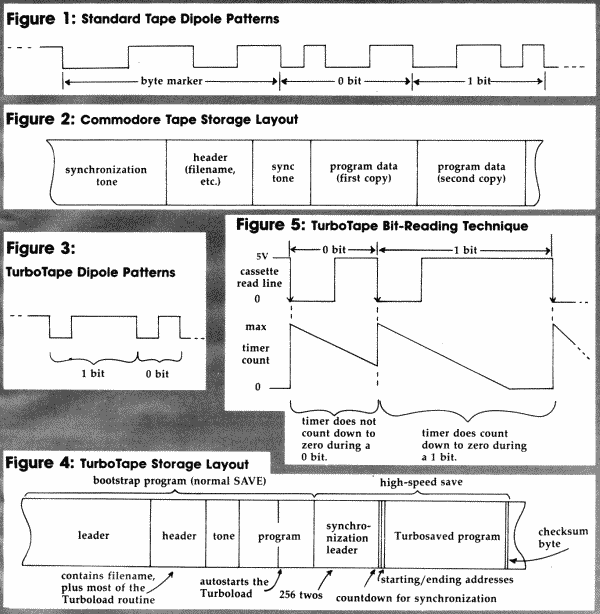
Each byte of data is preceded by a marker consisting of a long square wave followed by a medium one. A 0 bit is represented by a short wave followed by a medium wave, while a 1 bit is the opposite-a medium wave followed by a short one. Each byte on tape ends with a parity bit, which is either 0 or 1 as required to make the total number of 1 bits in the byte odd. The first few bits of a byte on tape might be represented graphically as shown in Figure 1.
Using the parity bit, each byte can be checked as it is retrieved from tape. If there is not an odd number of 1 bits in the byte plus its parity bit, an error results.
In addition, when you save a program on tape, the computer automatically records it twice, end to end. Graphically, a program stored on tape would have the layout shown in Figure 2. If an error is detected in the first recording, the computer remembers where the error occurred and corrects it with data from the second recording. You get the ?LOAD ERROR message only if more than 30 errors are detected on the first pass, or if there are errors in the first pass that can't be corrected in the second.
As you can see, the Commodore tape format is reliable because of its built-in error detection and correction. This, in turn, is the key to speeding up SAVEs and LOADs. Since you can't make the tape run faster, the only alternative is to change the recording format-cut back on Commodore's fail-safe mechanisms. TurboTape uses the bare minimum requirements to store data on tape. It's a method which is much like, yet much simpler than, Commodore's.
Turbowaves
TurboTape also creates a pattern of square waves on the tape, but instead of using a series of square waves to represent 0's and 1's, TurboTape uses a single square wave for each. The duration of the two square waves differs just enough to permit the loading routine to distinguish between them. TurboTape records the square waves on tape in the same manner as the normal SAVE routine, by toggling the cassette write line. This line comes from bit 3 of the internal input/output port of the 6510 microprocessor (location 1/$0001) in the 64, and from bit 3 of port B of VIA 2 (location 37152/$9120) in the VIC. As long as RECORD and PLAY are pressed on the Datassette, this line controls the signal written to the tape. When the write line is turned on, the recording head of the Datassette generates a magnetic pattern on the tape. When the line is turned off, the erase head of the recorder operates alone, and a blank area of tape passes through.
The TurboTape dipole starts as a transition from 5 volts (the on state) to 0 volts (the off state) on the cassette write line. In a Turbosave, the trough of the wave is always the same duration, whether the bit is 0 or 1 (thus, the patterns aren't truly square waves). Bits are distinguished by the length of the following 5V signal. A shorter 5V signal indicates a 0, and a longer 5V signal indicates a 1 (see Figure 3). So after the first burst of 5V noise, the first period of silence is constant. Following the quiet period, the write line is turned back on. The duration of the write signal determines the value of a bit (the difference in timing is related to the execution time of the routine which Turbowrites a bit, but the duration of a 1 bit is roughly three times as long as for a 0 bit).
Flouting Murphy's Law
The format used for Turbosaving is indeed the most compact method of storing tape data, but without error detection and correction it would not be trustworthy. Many things can go wrong (and according to Murphy's Law will go wrong) during a tape LOAD. If only one bit is missed during the LOAD, all of the following bits will be off by one, effectively rotating all the bytes as they are loaded-not a pretty sight.
To help prevent this unbalance, TurboTape precedes the Turbosaved data with a series of synchronization bits. The synchronization leader consists of the byte value of 2 repeated 256 times, followed by a countdown of 9, 8, 7, 6, 5, 4, 3, 2, 1. During a LOAD, TurboTape looks for these bytes. It reads eight bits, then checks to see if the eight bits represent a value of 2. If a 2 is found, TurboTape checks for another 2. Sooner or later, TurboTape runs out of 2's and finds the 9 of the countdown sequence. TurboTape then continues, looking for the rest of the sequence.
Suppose that TurboTape missed one of the bits during synchronization. It would be left with a byte not representing a 2, even if a 2 had been written on tape. At this point, the byte had better be a 9, the start of the countdown, or TurboTape assumes an error. If an error is detected this way, TurboTape assumes a mismatch and tries to find another 2. If TurboTape has found the 2 (instead of an 8 as the next value in the countdown), then even if the bad byte read previously was a 9, TurboTape knows that it was a false 9, not the start of the countdown. As long as the countdown sequence fails, Turbotape keeps trying to find 2's. The block of 2's gives TurboTape 256 opportunities to get into sync.
Assuming all is well, once 2's are no longer being received, TurboTape can verify the correct countdown sequence. TurboTape has insured that it is synchronized with the first bit of actual data. Only if the countdown is mangled will TurboTape fail to synchronize. This leader and countdown system is similar to the one used to synchronize tape reading in the regular SAVE format. If you've ever listened to a stored program on a regular recorder, you've heard the synchronization leader as the steady tone before the header and between the header and the program data.
Following the synchronization leader, the Turbosave routine writes the starting and ending addresses of the program. These are stored as the first four bytes of Turbosaved data. After writing the starting and ending addresses, TurboTape starts writing out bytes from memory, taking the bytes apart bit by bit, beginning at the starting address. As these bytes are written, TurboTape adds them to a checksum value. Since the addition is done in eight bits, the checksum never exceeds 255. It rolls over from 255 to 0, much like an automobile's odometer changes from 99999 to 00000. When the ending address is reached, a checksum is written out as the final byte of the Turbosave.
These are all the steps necessary to save a program at high speed, but the fast SAVE would be useless without a corresponding fast LOAD routine to retrieve the data. And you would lose all the timesaving advantage of the fast SAVE if the fast LOAD routine had to be loaded into memory separately each time you needed to bring a program in from tape. Fortunately, TurboTape provides a loading routine that is transparent to the user.
By Its Own Bootstraps
Each Turbosaved program is preceded on tape by a bootstrap program stored using the normal SAVE format. The bootstrap program contains the entire high-speed loader, so the TurboTape software is not needed to load a Turbosaved program. But how does a normal LOAD become a Turboload?
The portion of the bootstrap program actually saved as a program is quite short: 10 bytes in the 64 version and 14 bytes in the VIC version. The data is saved in nonrelocatable format, so it always loads beginning at location 812 ($032C). It may not be obvious, but this provides a simple but sophisticated way to make the regular LOAD automatically start the Turboload.
One of the last steps the computer takes when completing a standard LOAD is to call the CLALL (CLose ALL files) subroutine in the operating system ROM. CLALL passes through an indirect vector at addresses 812-813 ($32C-32D), but those addresses have been changed by the data from the bootstrap program, so that execution is passed to the start of the Turboload routine at 814 ($32E). However, the few bytes starting from location 814 obviously aren't enough to decipher the data Turbosaved on tape. The major portion of the Turboload machine language routine is in the cassette buffer.
How it gets there is another interesting story. You may not be aware of it, but every program stored on tape has a filename 187 charac ters long. Each program written to tape by the normal SAVE routine is preceded by a 192-byte header (see Figure 2). The length corresponds to the 192 bytes of the cassette buffer (locations 828-1019). The first five bytes of every tape header are used for a one-byte identifier, a twobyte starting address for the saved program, and a two-byte ending address. The remaining 187 bytes are available for the filename, although only the first 16 are commonly used.
The Turbosave routine makes use of this by filling all the locations after the sixteenth byte of the filename (starting at location 849) with the remainder of the Turboload machine language, where it is written out as part of the filename when the bootstrap program is saved. When the filename is found during the LOAD process, all the data in the program header is loaded into the cassette buffer. Thus, the few bytes of regularly saved data need do little more than transfer control to the remainder of the routine in the buffer. The complete layout of a Turbosaved program would be as shown in Figure 4.
Time Out For Reading
To read a bit, TurboTape makes use of several features of the peripheral interface chips-the CIA (Complex Interface Adapter) on the 64, or the VIA (Versatile Interface Adapter) on the VIC. Each of these chips has a line (FLAG on the CIA and CAI on the VIA) that can detect a high-tolow signal transition, the beginning of a dipole. These are used as the cassette read lines to the Datassette. To detect the start of a dipole, the Turboload routine monitors bit 4 of location 56333 ($DCOD) on the 64, or bit 1 of location 37165 ($912D) on the VIC. This bit will be set to 1 when the signal being read from tape changes from 5 volts to 0 volts, called the falling edge of the dipole (see Figure 5).
To determine whether the bit being read is a 0 or a 1, the Turboload routine starts a timer when the start of the dipole is detected. Each interface adapter chip has two 16-bit timer clocks. On the 64, Timer 2 of CIA #2 is used; the VIC version uses Timer 1 of VIA #1. The timers are like the familiar kitchen timers-they are set for the desired time and allowed to run until the time expires (until they count down to 0). The scheme is to set the timers for a period that is longer than the span of a 0 bit dipole, but shorter than the span of the dipole for a 1 bit. Then, when the next falling edge is detected, the status of the timer is checked. If the timer counted down to 0 before the start of the next dipole, then the time for the bit read was longer than the timer count and thus it was a 1 bit. If the timer is still counting when the next dipole starts, then the length of the dipole being read was shorter than the specified timer count, and thus it was a 0 bit.
The status of the timer can be determined by checking bit 1 of location 56589 ($DDOD) on the 64, or bit 6 of location 37149 ($911D) on the VIC. These will be 0 if the timers are still counting, or 1 if the timers have counted down to 0, which corresponds to the value being read from tape. By collecting these into groups of eight, the bytes of the program can be reassembled. The process is illustrated in Figure 5.
Turboverify operates by reading from tape the bootstrap program for the Turbosaved program to be verified, then modifying some of the Turboload code. It overwrites a store instruction with a compare and branch instruction. Thus, when the Turboload routine takes over, data read from the tape is only compared to the data already in memory, instead of being loaded over the existing data.
The Price Of Speed
After all the program data bytes have been read, one final value is retrieved from the tape. This byte is the checksum previously calculated during the Turbosave. This is the only error detection performed after header synchronization. If the checksum calculated during the Turboload does not match the one read from the tape, the LOAD must have failed.
However, even a correct checksum does not validate a LOAD, because there's more than one way to arrive at a certain sum. Since 2 + 4 + 6 = 1 + 4 + 7, addition is not a fail-safe checksum method. So you must realize that this speed enhancement does not come without a price. Nevertheless, we've found that the Commodore Datassette is still forgiving enough to make TurboTape reliable.
Unfortunately, the tape reading routines in the bootstrap program are specific to the CIA on the 64 and the VIA on the VIC, since the different chips must be accessed through different memory locations. Also, Turboload makes use of a number of ROM routines that are at different locations in the VIC and 64. So even though the high-speed portion of a Turbosaved program could be read by either machine, the Turboload routine is machine-specific. Since the VIC and 64 Turboload routines are entered automatically, neither routine will work on the wrong machine. There's just not enough room in the cassette buffer for a universal TurboTape LOAD routine that would work on both computers. This means that programs Turbosaved on a 64 can't be loaded into a VIC, and vice versa.
Bypassing Errors
TurboTape works fine in principle, but without a good link with the operating system, it would be cumbersome. For ease of use, TurboTape adds two commands to BASIC: TURBOSAVE (or TSAVE) and TURBOVERIFY (TVERIFY). The TurboTape program as published last month includes a built-in memory mover and relocator. When you initialize TurboTape, it copies itself to the top of memory (or optionally beginning at location 52606 on the 64), then corrects all the absolute machine language references such as JMPs, JSRs, and address tables. This relocator actually accounts for 170 of the 812 bytes of machine language in TurboTape.
When you type in the command TURBOSAVE, why don't you get a syntax error? It's certainly not a BASIC command. The answer is that when BASIC sees TURBOSAVE, it knows that TURBO is not a BASIC statement, so it assumes that it is a variable. BASIC then looks for the end of the variable, ready to assign it a value. Suddenly, it finds the command SAVE embedded within TURBOSAVE. A command like SAVE is not allowed as part of a variable name, so BASIC prepares to report a syntax error by jumping with the error code through the indirect error vector, contained in locations 768-769 ($300-$301).
This vector normally points to the BASIC ROM error-handling routines, but this is where TurboTape steps in. When first run, TurboTape changes the error vector to point to the relocated TurboTape machine language. From then on, whenever an error happens, TurboTape gains control. If the error is not a syntax error, TurboTape passes it along to the ROM error routine as usual. (It stores the original contents of 768-769 in 678-679, and uses those locations as its own indirect error vector.) For a syntax error, TurboTape checks for either the SAVE or VERIFY token. Since BASIC has rejected TURBO as a variable, the CHRGET routine is left pointing to the token after TURBO. (CHRGET is used by BASIC to scan for characters in a command or program line. Each call returns a new character and sets up CHRGET to point to the next character.) That's how TurboTape detects the SAVE command.
In fact, almost anything can precede the SAVE (such as SPEEDSAVE or even PIZZASAVE), as long as it's seen as a variable. The token which BASIC points to after the variable must be either 148 (SAVE) or 149 (VERIFY); otherwise, TurboTape jumps back to the normal ROM routine and a ?SYNTAX ERROR is properly reported.
Normal SAVEs do not go to TurboTape, since they do not pass through the error routine. Even if a SAVE ends in an error, CHRGET would no longer be pointing to the token for SAVE. This is an extremely elegant way of adding commands to BASIC, and it wedges into BASIC without interfering with BASIC extensions that use CHRGET (such as the DOS wedge) or other system vectors.